Management and owners
Control and profitability
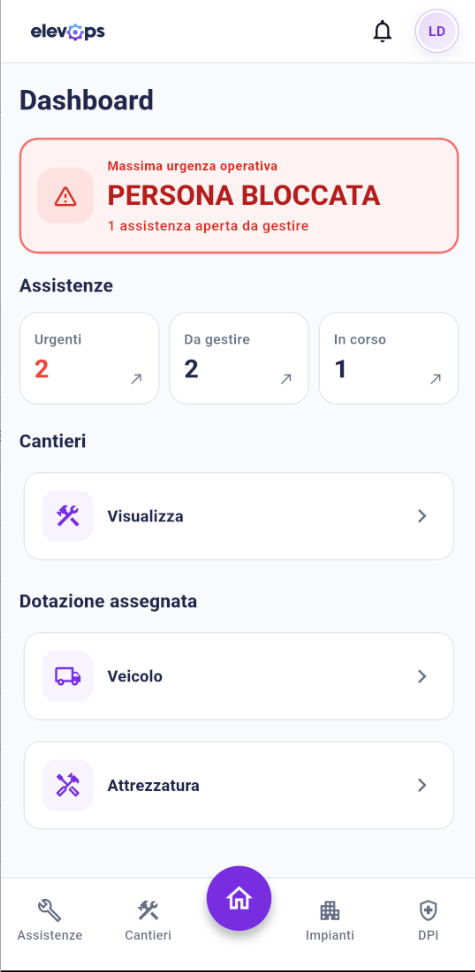
Site margins, pending jobs and regulatory deadlines under control in real time. The company picture always up to date without asking for reports at the end of the day.
Elevops
From an emergency call in the shaft to the site final statement: one infrastructure that syncs offices, vans and warehouse, cutting empty handoffs.
A single data source for the whole company: each role immediately reaches the information it needs, without chase-up calls, notebooks or duplicate files.
Control and profitability
Site margins, pending jobs and regulatory deadlines under control in real time. The company picture always up to date without asking for reports at the end of the day.
Call handling and planning
Crew planning, contracts and maintenance history in one screen. Cut the cross-calls to find who is closest and what is needed.
Mobile app and shaft data
Digital reports that work offline, installation fault history at hand, technical diagrams and van stock updated instantly.
Offers and modernisations
Component price lists ready, quotes for repairs and order confirmations unlocked on the fly: from the signed proposal to the work order without retyping a line.
The mobile app for technicians
Everything the maintainer needs on the smartphone: installation history, reports to close and parts on board, without depending on signal.
No problem. The app records every operation locally and sync with the platform starts automatically at the first usable signal.
Guided fill-in and customer signature on the display. The report reaches administration in real time, with no sheets to recover at the end of the day.
Open the installation record, previous jobs and emergency reports before you even open the electrical panel.
Check parts availability in your van or the central warehouse to avoid empty returns to the office.
Electrical diagrams, manufacturer manuals and building files always available from the site.
Operating flows
Information moves through the company without breaks. Select a flow to follow the data path between offices and vans.
The urgency enters once: priority, technician, job and customer document stay on the same thread.
Report
Open the ticket with installation, customer and priority already linked.
Assignment
Choose the technician from calendar or map, with urgencies highlighted.
Job
From the app, also offline: report, installation history and documents at hand.
Close
PDF report ready to send, without rebuilding data by hand.
From opening to the report in a few clicks
| Number | Installation | Technician | Status |
|---|---|---|---|
| AST-2026-0142 | Condominio Aurora | M. Bianchi | Open |
| AST-2026-0140 | Torre Navigli | L. Conti | In progress |
| AST-2026-0137 | Clinica San Marco | A. Russo | Scheduled |
| AST-2026-0133 | Residence Parco | M. Bianchi | Closed |
Job sites
It is not a simple task list: it is a dashboard that crosses people, documents, materials and vehicles on the job dates. The office decides with data, not guesses.
What readiness checks
Illustrative example of the Site ready tab: percentages and issues visible before start.
Technician training, fitness and PPE checked before assignment to the job site.
H&S plans uploaded on the site, with company review and approval.
Equipment and vehicles planned on the job dates, not just by eye.
From offer to service: each phase leaves documents and data that feed the next, without starting from scratch.
Linked modules
Choose the right setup for your company by switching on only what you need today, with the option to extend functions when the flows require it.
Dashboard, customers, calendar, map and notifications keep office, field and management together. The document archive stays in the same context, without scattered files.
Installations, maintenance contracts, service calls and job costing on the same thread: from ticket to report, through to a document ready to invoice.
Manufacturers, quotes, sales contracts and order confirmations follow on without retyping. From offer to signed document the data stays the same.
Warehouse, price list, suppliers and purchase orders on real stock, site by site, linked to quotes and job sites.
Installation and modernisation job sites, with a task board, equipment and vehicles on the right dates.
Training, medical fitness, PPE and site-safety documents: the technician operating passport, linked to start readiness.
Cloud architecture
Elevops is cloud and multi-company: no on-site server, no manual updates. The team signs in with clear roles and works on the same data.
Onboarding
We guide the transition step by step to cut idle time to zero. Exact duration adapts to the volume of data to import and the structure of the plan you choose.
Days 1–2
You quickly see what you really need: plan, modules, key people and materials to bring. Together we set the go-live date.
Days 2–8
You do not start from scratch: we load price lists, people and records so on day one you already have the real context.
Days 5–10
Letterheads, numbering, warehouse sites and permissions: everything aligned to how you work, not a generic template.
Days 8–14
We do not leave you alone with the software: we coach the team and train who operates and who administers.
End of week 2
You start with real documents and jobs. We stay close to fix straight away what comes up in the first days.
Price lists
Make quotes and job costing applying your usual margins straight away.
Employees and users
Technicians and administration get access immediately with the right permissions.
Customers
Administrators, condominiums and private clients already structured in the records.
Suppliers
Purchase catalogue and supply terms ready to use.
Manufacturers
Brands, models and variants ready for installation records.
Operational data
Active contracts, histories and sites integrated in a single archive.
Dedicated demo
In a dedicated demo we map service calls, sales, warehouse or job sites on your real operations.
We build a practical working session to guide you in choosing the plan that fits your company’s needs.
We build a practical working session to guide you in choosing the plan that fits your company’s needs.